Officially only options LEGACY+UEFI and UEFI were available. To install Server F32 on SSD Drive I selected CD-DVD device as boot able. Afterwards everything went fine and system was installed in pure Legacy BIOS Mode on SSD. Problem has raised up a bit latter after testing via pressing "F11" I was able to make sure that SSD drive is a primary boot able device and decided to make this configuration static. But any drive from nice line of small pictures
"Boot Priority" gave me a wrong drive. SSD seemed to be gone from "Boot Priority" line.
Three steps which allowed me to set up SSD Drive as primary boot able are shown below
1. Select OS Setting "Boot" menu.
![]()
Scroll it down to invisible options following up the visible list
![]()
Click on first line "Hard Disk Drives BBS priorities". BBS stands for "Bios Boot priority", to get into final selection supposed to bring you to success. Of course, if setting up "Legacy BIOS" in meantime might be associated with word "success".
![]()
Select SSD Drive from all options available and press "Enter" followed by "F10". I believe that this exercise might be a bit more straight forward ( even Legacy BIOS is almost dead ).
That's why I also believe that board's prices difference between ASUS and MSI is quite reasonable. Just around $100 and $200.
"Boot Priority" gave me a wrong drive. SSD seemed to be gone from "Boot Priority" line.
Three steps which allowed me to set up SSD Drive as primary boot able are shown below
1. Select OS Setting "Boot" menu.
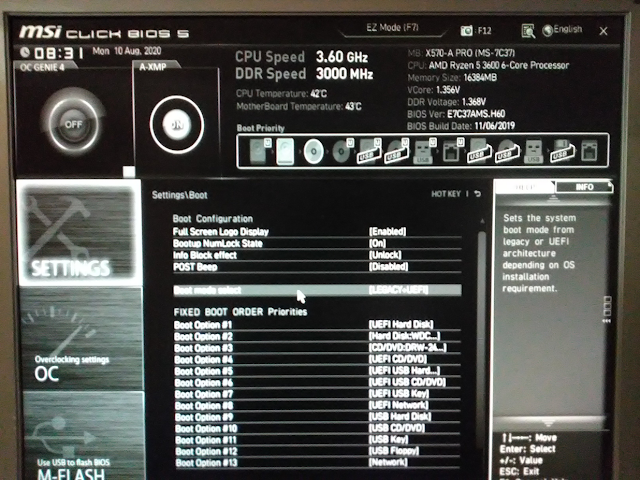
Scroll it down to invisible options following up the visible list

Click on first line "Hard Disk Drives BBS priorities". BBS stands for "Bios Boot priority", to get into final selection supposed to bring you to success. Of course, if setting up "Legacy BIOS" in meantime might be associated with word "success".
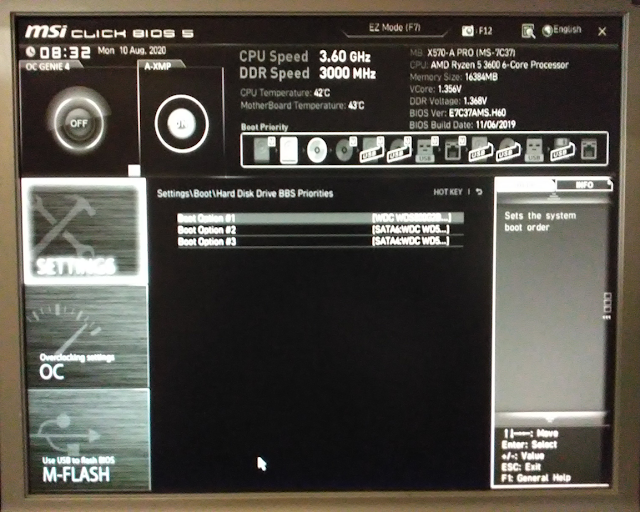
Select SSD Drive from all options available and press "Enter" followed by "F10". I believe that this exercise might be a bit more straight forward ( even Legacy BIOS is almost dead ).
That's why I also believe that board's prices difference between ASUS and MSI is quite reasonable. Just around $100 and $200.